

A truck appointment system for CFS operations works best when vehicle schedules are connected with actual cargo readiness. A time slot alone cannot prevent delays if the required import cargo is still in storage, remains under restriction or has not yet been moved to the dispatch area.
The same applies to export operations: knowing when a truck will arrive is more useful when the CFS also knows what cargo the vehicle is bringing and which warehouse process should begin after arrival.
Solvo.WMS connects delivery requests and warehouse execution with vehicle arrival planning so cargo, warehouse resources and truck visits can be coordinated as one process.
How a Truck Appointment System for CFS Works
A CFS visit is usually connected to a specific operational purpose.
A truck may arrive to:
- collect imported cargo;
- deliver export cargo;
- support another warehouse service.
The warehouse therefore needs more than the vehicle’s registration number and arrival time.
It also needs the operational context behind the visit.
Depending on the process, this can include:
- delivery or receiving request;
- cargo reference;
- owner or consignee;
- scheduled time;
- required warehouse operation;
- current cargo readiness.
Connecting this information helps the warehouse prepare before the vehicle reaches the facility.
Why Cargo Readiness Matters
Consider a simple import scenario.
A truck has a valid appointment for 11:00, but the requested cargo is still stored at the back of the warehouse.
If warehouse staff only begin looking for it when the driver checks in, the appointment has not removed the operational delay. It has only scheduled it.
Solvo.WMS can use the delivery request to create picking and staging work before the vehicle arrives.
Address-based storage shows where the cargo is located, while system-generated tasks guide employees through preparation.
The truck visit and the internal warehouse process can therefore follow the same plan.
Import Pick-Up Requests
For import cargo, a delivery or pick-up request can start the outbound process.
Depending on the integration scenario, the request may arrive from:
- ERP;
- another connected system;
- Solvo.Web;
- manual entry.
The WMS identifies the requested cargo and checks the relevant operational conditions.
Warehouse teams can then pick and stage cargo before the planned visit.
See the full CFS Import Process.
Export Cargo Drop-Off
Truck planning is also relevant to export receiving.
Instead of processing an unexpected vehicle after arrival, the CFS can have information about the planned visit in advance.
The warehouse can prepare the required receiving area and understand which shipment or booking is associated with the incoming cargo.
Once received, the cargo enters the CFS Export Process for storage, consolidation and eventual stuffing.
Time-Slot Management
Time slots help distribute vehicle demand over the operating day.
The objective is to avoid a situation where too many vehicles arrive simultaneously even though warehouse resources, docks or staging areas cannot process all of them at once.
A planned schedule can help CFS operators:
- balance arrival peaks;
- prepare cargo in advance;
- organize warehouse resources;
- reduce uncontrolled queues;
- provide a more predictable collection process.
The exact scheduling rules can be configured according to facility requirements.
Gate Integration for CFS Operations
When the vehicle reaches the terminal or warehouse gate, the visit may also need to be validated against the gate environment.
Relevant data can include:
- vehicle details;
- driver details;
- visit number;
- scheduled time;
- requested operation;
- cargo or order reference.
The specific gate architecture depends on the facility and existing equipment.
Solvo.WMS can exchange relevant information with gate and other external systems instead of turning gate control into a manual disconnected process.
Solvo.WMS and Solvo.YMS
Large logistics sites may require more than appointment planning.
Once a truck passes the checkpoint, it may still need to move through:
- waiting areas;
- internal roads;
- staging zones;
- loading docks;
- multiple warehouse buildings.
This is the role of a dedicated Yard Management System.
Solvo.YMS manages vehicle visits, checkpoints, yard movements, waiting areas and dock-related processes.
Solvo.WMS remains responsible for the cargo and warehouse tasks.
Together, the systems can connect:
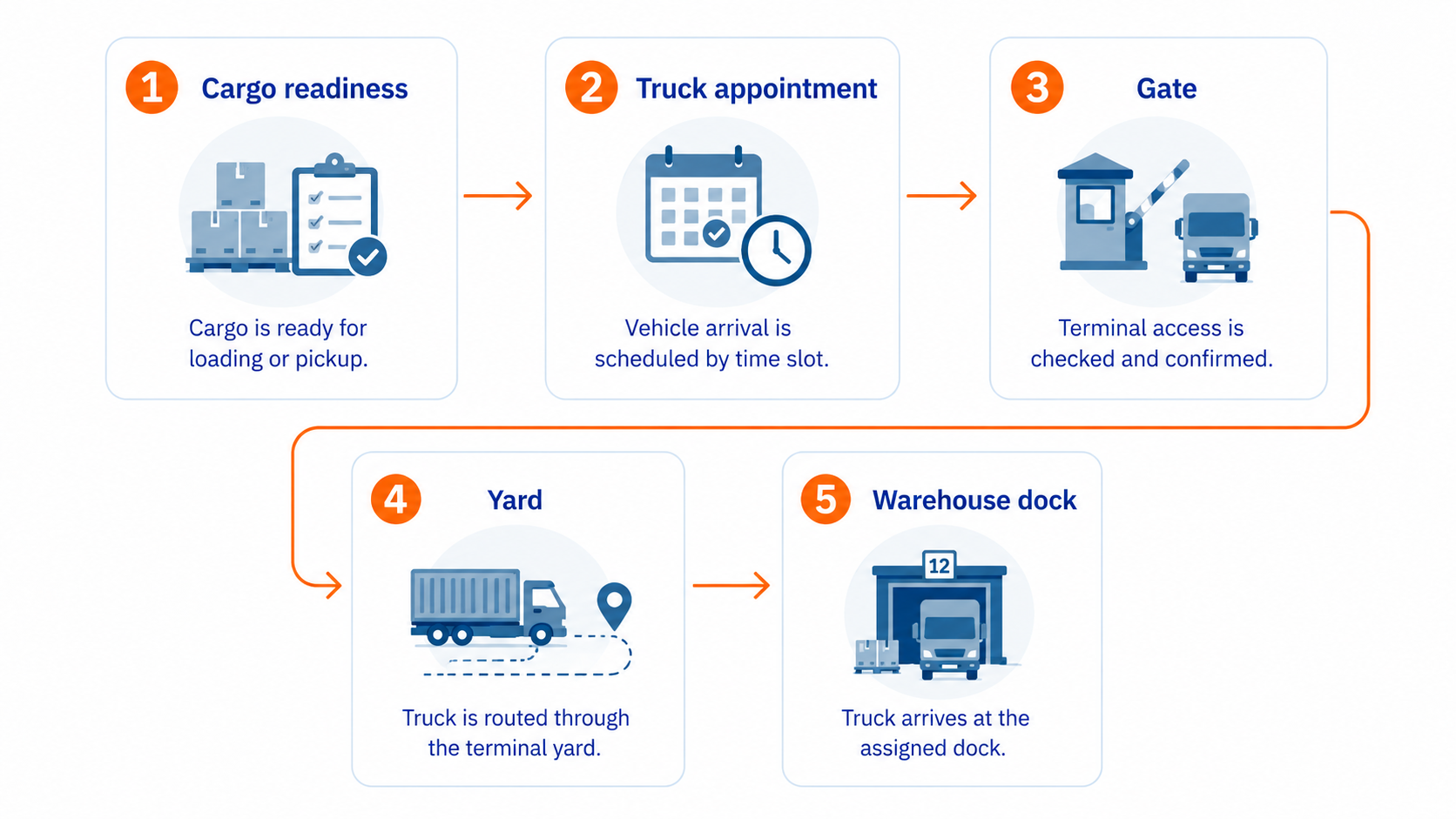
Measure Truck and Warehouse Coordination
Once vehicle planning and warehouse preparation use connected operational data, the terminal can analyze where delays occur.
Relevant indicators can include:
- scheduled versus actual arrival;
- cargo readiness before arrival;
- waiting time before loading;
- time spent at the warehouse;
- completion of dispatch operations.
This helps distinguish a gate problem from a warehouse-preparation problem.
Frequently Asked Questions
What is a truck appointment system for CFS?
It coordinates planned vehicle arrival times with cargo receiving or release operations at a Container Freight Station.
How can truck appointments reduce CFS queues?
Appointments distribute vehicles across available time periods and allow the warehouse to prepare receiving or dispatch operations before trucks arrive.
Can appointments be linked to delivery requests?
Yes. A connected workflow can associate a planned visit with a delivery or receiving request and the related warehouse tasks.
What is the difference between WMS and YMS in truck processing?
The WMS manages cargo and warehouse execution. A YMS manages vehicles, gates, waiting areas and yard movements outside the warehouse.
Connect Truck Arrivals with Cargo Readiness
Coordinate time slots, cargo preparation, staging and gate processes around the actual CFS workload.