

The CFS import process begins when container-level handling turns into cargo-level warehouse operations. Once an import container is stripped, the warehouse is no longer dealing with a single transport unit. It may need to control dozens of pallets, cartons or other cargo units belonging to different owners and consignees, covered by different Bills of Lading and released at different times.
This is where a warehouse management system becomes essential. Solvo.WMS for CFS & Terminal Warehouses connects container stripping, cargo receiving, identification, temporary storage, status control, delivery requests, picking, staging and final release in one operational environment.
How the CFS Import Process Works
A typical CFS import workflow moves through several closely connected stages: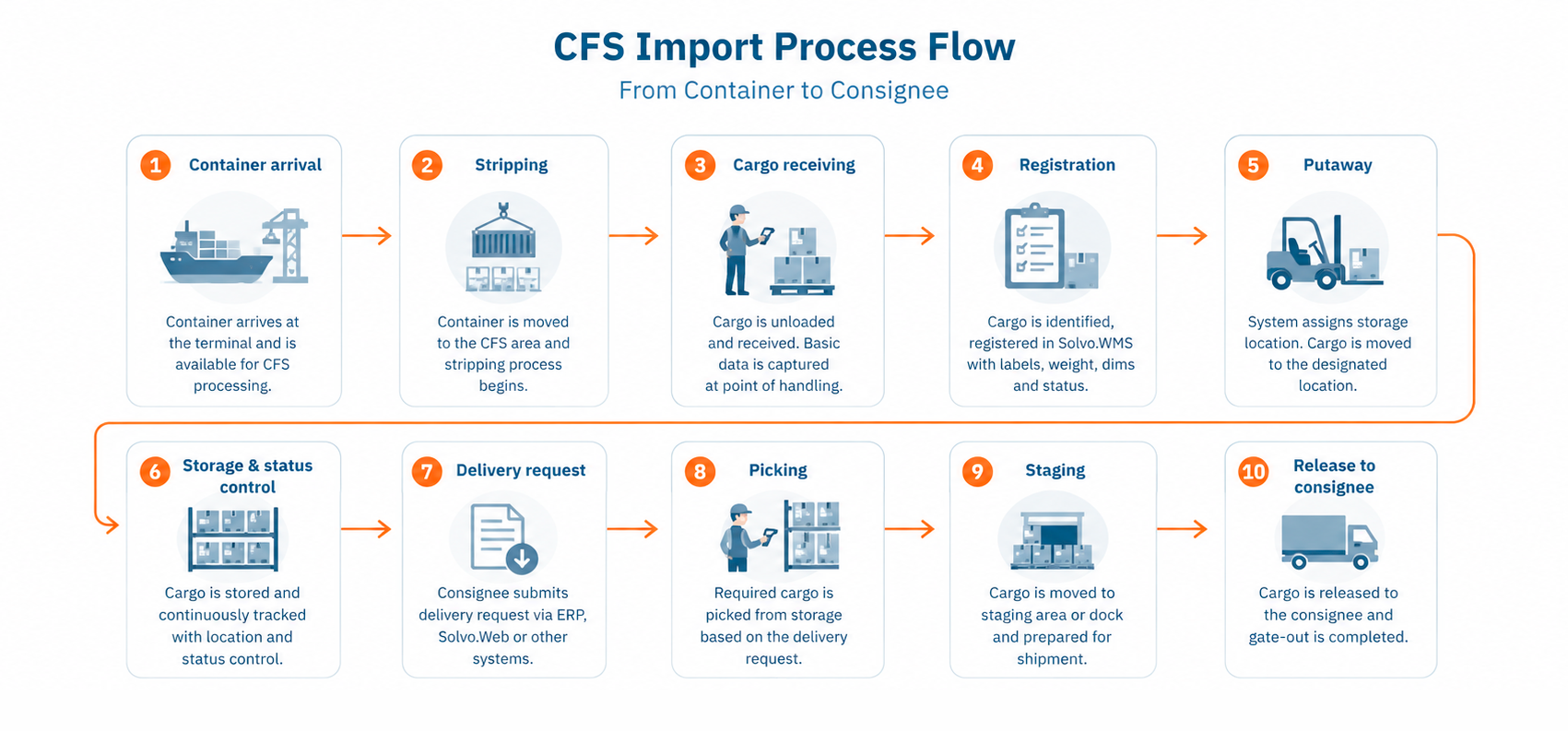
Each stage changes the status or physical location of the cargo. Solvo.WMS keeps these changes connected so warehouse teams know what has arrived, where it is stored and what can happen to it next.
Container Stripping and Cargo Receiving
Before stripping, the container is primarily managed within the terminal process. A TOS or another external system can provide Solvo.WMS with container and shipment information required for warehouse operations.
Once the container is available for CFS processing, the warehouse begins deconsolidation and receiving.
Operators can register cargo directly at the point of handling using mobile terminals. Depending on the process, receiving may include:
- scanning or entering a cargo identifier;
- linking cargo to a Bill of Lading or receiving document;
- registering pallets, cartons or other handling units;
- printing or reusing cargo labels;
- capturing weight and dimensions;
- recording cargo category and status;
- taking photos;
- registering damage or discrepancies.
The result is a cargo-level record that remains available throughout storage and release.
For LCL containers containing cargo for several consignees, see LCL Cargo Consolidation and Deconsolidation.
Cargo Registration and Address-Based Storage
After receiving, cargo needs more than a general “in warehouse” status. The WMS must know its exact physical location.
Solvo.WMS supports address-based storage and can generate movement tasks for warehouse operators and forklift drivers. The employee receives instructions on a mobile terminal, moves the cargo to the required location and confirms the operation by scanning the cargo and destination.
Storage allocation can be based on configurable criteria such as:
- cargo owner or consignee;
- Bill of Lading;
- cargo category;
- product or manufacturer;
- storage requirements;
- expected storage duration;
- dispatch priority;
- warehouse topology.
For example, cargo expected to leave shortly can be positioned closer to staging or dispatch areas, while goods requiring longer storage can be directed elsewhere.
Read more about the inventory model on the CFS Inventory Management page.
Customs Status Control Before Cargo Release
Physical availability does not always mean that imported cargo can leave the warehouse.
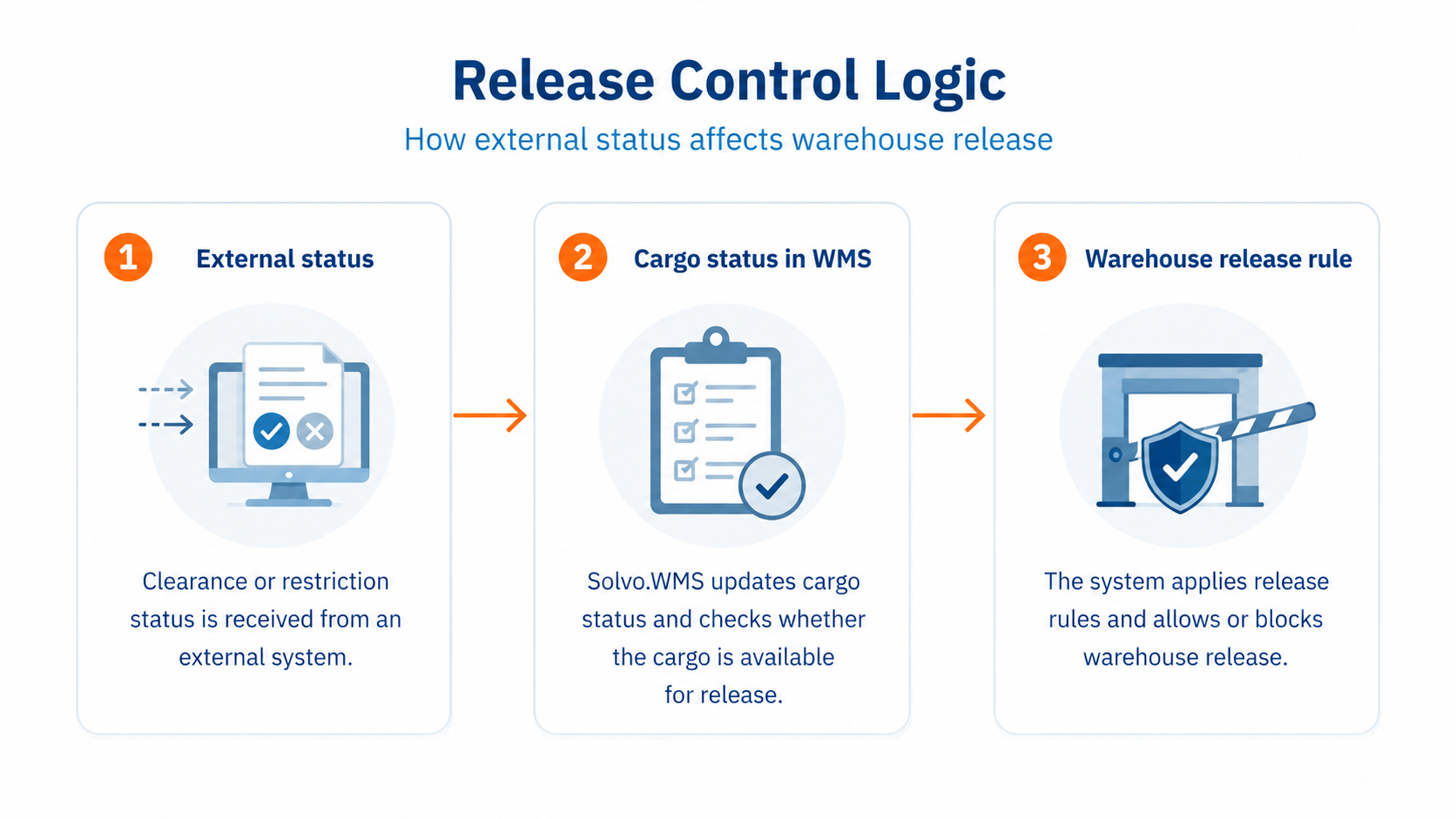
Cargo may already be received and stored while still waiting for the required customs-related status or another release condition. Solvo.WMS can receive or record such statuses and use them directly in warehouse execution.
If the required clearance status has not been confirmed, the cargo can remain blocked from dispatch.
Solvo.WMS does not replace the system responsible for customs declarations. Instead, it makes external customs-related information actionable inside warehouse operations.
This creates a controlled sequence:
 Learn more about this process in Bonded Warehouse Management.
Delivery Requests, Picking and Staging
When cargo is available for collection, a delivery request can start the outbound warehouse process.
Depending on the integration scenario, the request can be:
- received from ERP;
- received from another external system;
- submitted through Solvo.Web;
- created manually by warehouse personnel.
Solvo.WMS identifies the cargo required for the request and generates warehouse tasks.
Cargo can then be picked from storage and moved to a staging area, dispatch dock or directly to the loading point. Because its exact location is already recorded in the WMS, employees do not need to search manually across the warehouse.
The system also retains information about which cargo was selected, who handled it and when the operation was completed.
Coordinate Truck Arrival with Cargo Readiness
Cargo release is faster when truck planning and warehouse preparation are coordinated.
Without appointment planning, several consignees may arrive at the same time while warehouse staff are still looking for cargo. This creates congestion even when the warehouse has enough physical capacity.
Time-slot management allows vehicle arrivals to be distributed according to operational capacity. The warehouse can receive the delivery request in advance, pick the required cargo and move it to staging before the scheduled truck reaches the facility.
See Truck Appointment and Gate Integration for CFS for the complete vehicle workflow.
Cargo-Level Traceability Throughout the Import Flow
A CFS must often answer questions that cannot be resolved from the original container record alone:
- Where is this pallet now?
- When was it received?
- Who moved it?
- Was damage recorded?
- Is it cleared for release?
- Has part of the shipment already been dispatched?
- Which operation was performed before the customer claim?
Solvo.WMS maintains warehouse operation history as cargo moves through the process. Photo capture and CCTV integration can provide additional evidence for investigating cargo damage, discrepancies or disputes.
How Solvo.WMS Supports the CFS Import Process
Solvo.WMS creates a controlled warehouse layer between terminal operations and consignee delivery.
Instead of coordinating container stripping, storage and release through disconnected records, the warehouse works with a current cargo-level view covering:
- cargo identification;
- warehouse location;
- owner and consignee;
- Bill of Lading;
- operational and customs-related status;
- handling history;
- delivery request;
- picking and staging;
- dispatch confirmation.
The TOS continues to manage container and terminal processes, while the WMS controls what happens to the cargo after stripping.
Read more about the system boundary in TOS and WMS Integration for CFS.
Frequently Asked Questions
What happens during the CFS import process?
A typical import CFS workflow includes container stripping, cargo identification and receiving, temporary storage, status control, delivery request processing, picking, staging and release to the consignee.
How does a WMS support container stripping?
A WMS manages the cargo-level operations created after stripping. It can register individual cargo units, print labels, capture cargo information, assign storage locations and create warehouse tasks for subsequent handling.
Can Solvo.WMS prevent cargo from being released before customs clearance?
Solvo.WMS can use customs-related statuses received from external systems as warehouse execution rules and restrict dispatch until the required status has been confirmed.
Can import cargo be prepared before the truck arrives?
Yes. Delivery requests, address-based storage, picking tasks, staging and time-slot integration allow the warehouse to prepare cargo before a planned vehicle visit.
Bring Cargo-Level Control to Your CFS Import Process
Connect stripping, receiving, temporary storage and cargo release with your existing terminal and logistics systems.